> ## Documentation Index
> Fetch the complete documentation index at: https://docs.gitar.ai/llms.txt
> Use this file to discover all available pages before exploring further.
# Slack
> Send updates and notifications to your Slack workspace with Gitar
export const ThemeImage = ({src, alt}) => {
let lightSrc, darkSrc;
if (src.includes("-light.")) {
lightSrc = src;
darkSrc = src.replace("-light.", "-dark.");
} else if (src.includes("-dark.")) {
darkSrc = src;
lightSrc = src.replace("-dark.", "-light.");
} else {
lightSrc = src;
darkSrc = src;
}
return

 ;
};
## Overview
The Gitar Slack App enables your team to stay informed about pull request activity without leaving Slack. Get notifications on code reviews, CI failures, and other updates directly in your channels.
Send to public or private channels
Notify individual users
Pull Slack context into reviews
## Get Started
Follow these steps to connect your Slack workspace with Gitar.
Navigate to your organization's settings in the Gitar dashboard to begin the integration:
1. Navigate to your organization's **Settings** in the Gitar dashboard
2. Go to the **Integrations** section
3. Find the **Slack** card under **Communication** and click **Connect**
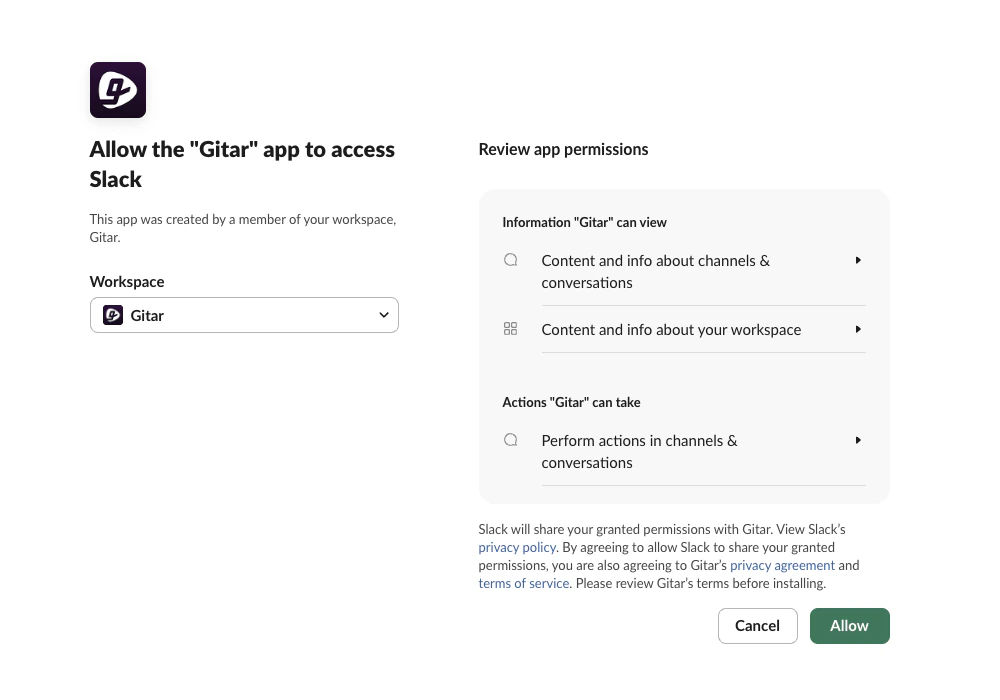
You'll be redirected to Slack's authorization page to approve the Gitar Slack App:
1. Select the workspace where you want to install the Gitar Slack App
2. Click **Allow** to authorize the installation
;
};
## Overview
The Gitar Slack App enables your team to stay informed about pull request activity without leaving Slack. Get notifications on code reviews, CI failures, and other updates directly in your channels.
Send to public or private channels
Notify individual users
Pull Slack context into reviews
## Get Started
Follow these steps to connect your Slack workspace with Gitar.
Navigate to your organization's settings in the Gitar dashboard to begin the integration:
1. Navigate to your organization's **Settings** in the Gitar dashboard
2. Go to the **Integrations** section
3. Find the **Slack** card under **Communication** and click **Connect**
You'll be redirected to Slack's authorization page to approve the Gitar Slack App:
1. Select the workspace where you want to install the Gitar Slack App
2. Click **Allow** to authorize the installation
 Once connected, you can ask Gitar to send Slack notifications directly from your pull requests. Simply comment on your PR with instructions for Gitar.
**Channel reaction example:**
**Direct message example:**
Once connected, you can ask Gitar to send Slack notifications directly from your pull requests. Simply comment on your PR with instructions for Gitar.
**Channel reaction example:**
**Direct message example:**